Draft & edit
Draw lines, polylines, rectangles, circles, dimensions and text. Use layers, snaps and editing commands.
Draft, edit and explore construction designs with MAQS Pro CAD V02. A full drawing workspace with 2D tools, 3D views and construction extensions.
Free to use · No registration · No subscription
Drawings are processed in your browser.
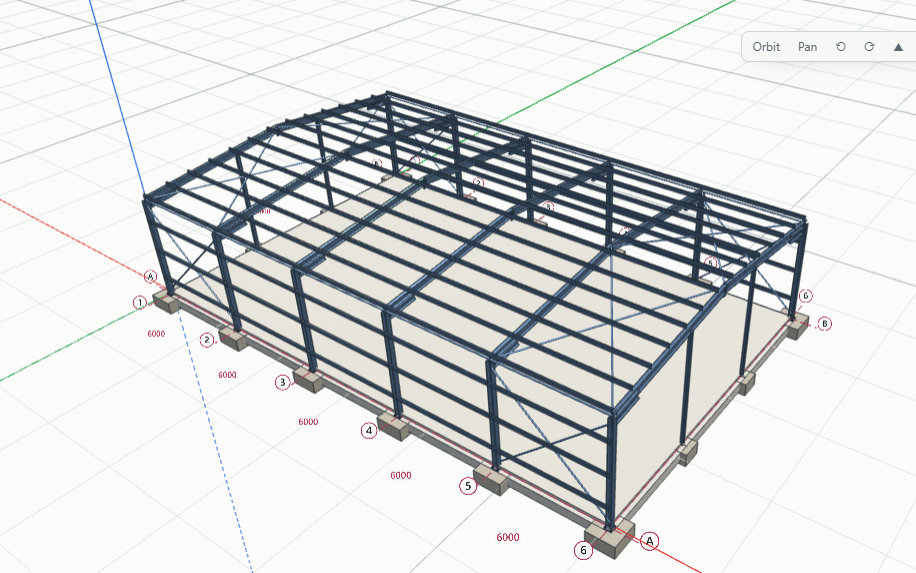
FACTORY UNIT · STEEL FRAME & FOUNDATIONS
Draw lines, polylines, rectangles, circles, dimensions and text. Use layers, snaps and editing commands.
Explore 3D views and construction extensions for structural, architectural and site work. Drawing dimensions use millimetres.
Save and reopen native drawing files. Export drawings using the supported file commands and keep copies on your computer.
Download the ZIP, choose Extract all, then run INSTALL.bat. This creates a desktop shortcut to the online CAD app using Microsoft Edge or Chrome. An internet connection is required.
Download Windows online-app installer ↓Windows 10/11 with Microsoft Edge or Chrome · V02, build 2.15.0 · Internet required.
You can also use the online tool directly without installing anything.
If MAQS Pro CAD V02 has helped you, you can make a voluntary contribution towards its development and improvements.
The full CAD tool remains free to use. Contributing is optional and does not start a subscription.
Secure checkout on PayPal.
No card details are collected on this website.
Open CAD to try the sample drawing. Use File → Open to choose your PDF, or New to start a blank sheet. Calibrate against a known dimension before measuring a drawing.
Your drawings are processed on your device. Use Save or Export to download your work. Browser storage may remember settings and drawings, but it is not a substitute for saving your files. Clearing browser data can remove locally remembered work.
The optional Python console runs in your browser using the bundled Python runtime. Its first start downloads the runtime and can take a little longer. No separate Python installation is needed for the online tool. The 3D workspace needs a browser with WebGL graphics support.
Aggregate page views, MAQS Pro link clicks and Support clicks are recorded. Optional browser identifiers estimate visits and unique visitors only if you allow them. No drawing contents are sent to the statistics system. Support clicks are not confirmed payments.